Free QR Code Generator — Codes That Never Expire
Every code here is a static QR code: your data is baked into the pattern itself, with no server or account behind it. Nothing can deactivate it — print it once and it scans forever.
Why this tool exists: most “free” QR generators create dynamic codes that route through the company's server — and quietly deactivate them when your 7–14 day trial ends, making every printed copy worthless. Static codes have no server behind them. Nobody can turn yours off, including us.
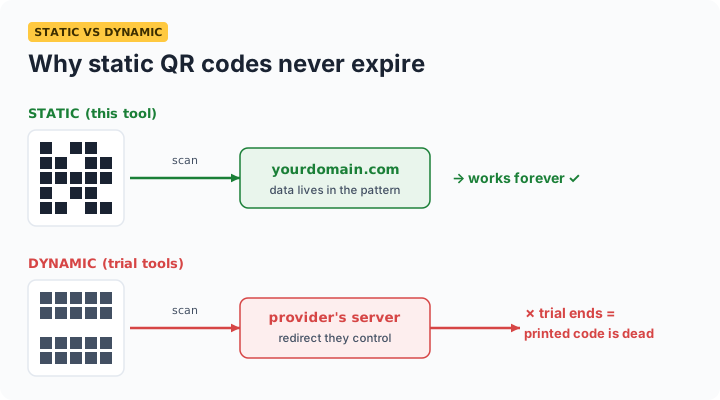
Static vs dynamic QR codes
| Static (this tool) | Dynamic (most "free" tools) | |
|---|---|---|
| Expires | Never | When trial or subscription ends |
| Server dependency | None | Provider's redirect server |
| Editable after printing | No | Yes |
| Scan tracking | No | Yes |
| Account required | No | Usually |
| True cost | Free forever | Typically $7–25/month after trial |
If you need to change the destination after printing or track scans, a paid dynamic service is the right tool. For everything else — menus, flyers, packaging, Wi-Fi sharing, business cards — a permanent static code is safer and genuinely free.
How to make a Wi-Fi QR code
Select Wi-Fi network as the type, enter your network name and password, and generate. Guests scan the code with their phone camera and get a one-tap “Join network” prompt — no password typing. The credentials are encoded in the image itself; they are never sent to any server, including ours.
Frequently asked questions
Will my QR code expire or stop working?
No — never. Static codes encode your data directly in the pattern. There's no server, redirect, or account involved, so nothing can be switched off. Printed codes scan the same in ten years as today.
What is the difference between static and dynamic QR codes?
Static codes are permanent and free but not editable after printing. Dynamic codes are editable but route through a provider's server — and die when you stop paying or the provider shuts down.
Why do QR codes from other free generators stop scanning?
They were dynamic codes on a trial plan. When the trial ends, the provider deactivates the redirect — making every printed copy worthless. Static codes cannot be deactivated by anyone.
Can I use these QR codes commercially?
Yes — no watermark, no restrictions. Ideal for menus, flyers, packaging, business cards, and posters. Double-check your URL before printing, since static codes can't be edited afterwards.
How do I make a Wi-Fi QR code?
Choose the Wi-Fi tab, enter your SSID and password, and generate. Scanning offers a one-tap join. The details are encoded in the image and never leave your device.
What size should I print a QR code?
Minimum 2 × 2 cm for close-range scanning. Rule of thumb: scanning distance ÷ 10 — a code scanned from 1 m away should be at least 10 cm wide. Download at 1024 px and scale down in print.