Free Password Generator
Generate strong, random passwords instantly. Everything happens in your browser with cryptographic randomness — your password is never sent anywhere, stored, or logged.
Quick presets:
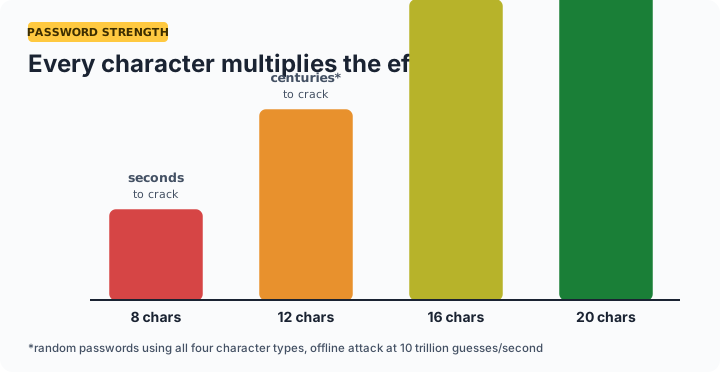
How strong should your password be? A random 16-character password using all four character types has more than 1031 possible combinations — far beyond any practical brute-force attack. For everyday accounts use 16 characters; for a password manager master password or Wi-Fi network, use 20 or more.
How to generate a strong password
Set your length with the slider (16 is a strong default), tick the character types you want, and click Generate password. Click Copy and paste it into your signup form or password manager. If a website rejects symbols, untick Symbols and add 4 extra characters of length to compensate — length is the strongest ingredient.
Password length vs. cracking time
| Length | Character types | Approximate combinations | Practical security |
|---|---|---|---|
| 8 | lowercase only | 2 × 10¹¹ | Weak — crackable |
| 12 | all four types | 5 × 10²³ | Good for low-value accounts |
| 16 | all four types | 4 × 1031 | Strong — recommended default |
| 20 | all four types | 3 × 1039 | Excellent — master passwords, Wi-Fi |
| 32 | all four types | 1 × 1063 | Maximum — API keys, encryption |
Frequently asked questions
Is this password generator safe to use?
Yes. Passwords are generated entirely on your device using your browser's built-in cryptographic random number generator (crypto.getRandomValues). Nothing is sent to a server, stored, or logged — you can disconnect from the internet and the tool still works.
How long should a strong password be in 2026?
At least 16 characters for important accounts. A random 16-character password mixing all character types is far beyond practical brute-force attacks. For a password manager master password, use 20 or more.
What makes a password strong?
Length and randomness. Length matters more than complexity — each extra character multiplies the possible combinations. Randomness means no dictionary words, names, dates, or keyboard patterns.
Should I use a different password for every account?
Yes, always. When one website is breached, attackers try the leaked combinations everywhere else (credential stuffing). Unique passwords contain the damage. Use a password manager to store them.
Is it safe to generate a Wi-Fi password with this tool?
Yes. A good WPA2/WPA3 password is 16–20 random characters, and since this runs offline in your browser, it never leaves your device. Pair it with our QR code generator to make a scannable Wi-Fi login for guests.
Why should I avoid personal information in passwords?
Names, birthdays, and pet names are the first things attackers guess, because that information is often publicly visible on social media. Random generation removes the guessable element entirely.