Cron Expression Parser
Paste any standard 5-field cron expression and get what it means in plain English, plus the next five times it will actually fire — the fastest way to sanity-check a schedule before deploying it.
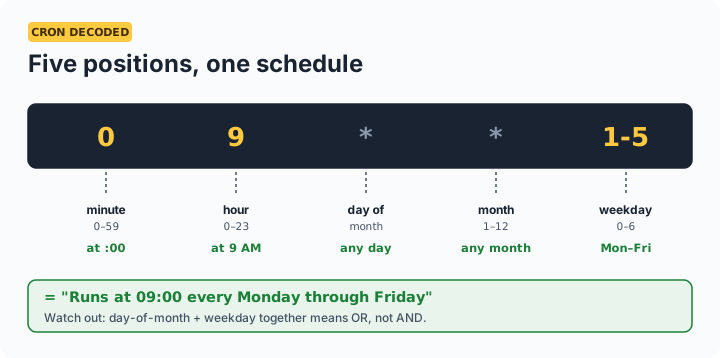
The five fields, in order: minute (0–59) · hour (0–23) · day of month (1–31) · month (1–12) · day of week (0–6, Sunday = 0). Syntax: * any · */15 every 15 · 1-5 range · 1,15 list. 0 9 * * 1-5 = 9:00 AM every weekday.
The cron gotchas that page people at 3 AM
| Gotcha | Detail |
|---|---|
| Day-of-month + day-of-week is OR | 0 0 13 * 5 runs on the 13th AND every Friday — not only Friday the 13th |
| Timezone | Classic cron uses the server's timezone — a "9 AM" job on a UTC server fires at 2:30 PM IST |
0 0 * * * vs * * * * * | Once at midnight vs every single minute — a one-character disaster |
| Sunday is 0 (and often 7) | Both usually work, but scripts comparing the value should normalize |
| %, @reboot, 6-field seconds | Non-standard extensions — supported by some crons (Quartz, systemd differ); this parser covers the portable 5-field standard |
Frequently asked questions
What does 0 9 * * 1-5 mean?
At 09:00 every Monday through Friday — the classic 'weekday mornings' schedule. Fields read minute (0), hour (9), any day of month (*), any month (*), weekday 1-5 (Mon–Fri). The next-runs list above shows exactly when it fires in your timezone.
Why does my cron with both a day and a weekday run more often than expected?
Standard cron treats day-of-month and day-of-week as OR when both are restricted: 0 0 13 * 5 fires on every 13th AND every Friday. To get 'Friday the 13th only', put one condition in cron and check the other inside your script.
What timezone are the next-run times in?
This tool shows your browser's local time. Real cron daemons use the server's timezone — the most common cron surprise for Indian teams on UTC servers, where a 9 AM job means 2:30 PM IST. Set the TZ variable or convert deliberately.
How do I run something every 30 seconds with cron?
Standard cron's smallest unit is one minute. Common workaround: two entries — the job, plus the same job with sleep 30 prefixed. For genuinely sub-minute scheduling, use systemd timers or your language's scheduler instead.