JSON to YAML Converter
Convert JSON to clean, correctly indented YAML — or paste YAML and get JSON back. Built for the configs you actually work with: Kubernetes manifests, Docker Compose, GitHub Actions, and OpenAPI specs.
Quick answer: paste JSON on the left, click Convert to YAML, and copy the result. The converter validates your input first, so a missing comma or stray quote is reported with the exact error instead of producing broken YAML.
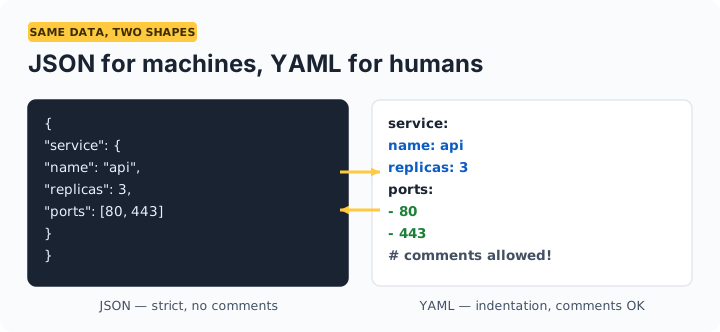
JSON vs YAML: when each wins
| JSON | YAML | |
|---|---|---|
| Best for | APIs, data exchange, machine-to-machine | Config files humans edit (K8s, CI, Compose) |
| Comments | Not supported | Supported with # |
| Readability | Brackets and quotes everywhere | Indentation-based, minimal punctuation |
| Strictness | Very strict — easy to validate | Flexible — indentation errors are easy to make |
| Superset? | — | YAML 1.2 is a superset of JSON |
Frequently asked questions
Will comments survive the conversion?
No — JSON has no comment syntax, so YAML-to-JSON conversion necessarily drops # comments, and JSON input has none to carry over. If you convert YAML to JSON and back, re-add comments manually.
Is this suitable for Kubernetes and Docker Compose files?
Yes. The output uses 2-space indentation, the standard for Kubernetes manifests, Compose files, and GitHub Actions workflows. Converting a JSON API response to YAML is a quick way to scaffold a config.
Why does my converted YAML quote some strings but not others?
The converter quotes strings only when required — values like yes, no, on, off, or numbers-as-strings get quoted so they stay strings instead of being reinterpreted as booleans or numbers by YAML parsers.
Is my config uploaded anywhere?
No. Conversion happens entirely in your browser. Configs often contain hostnames and internal details — they never leave your device.