CSV to JSON Converter
Paste CSV — from Excel, Google Sheets, or an export — and get a clean JSON array. The parser handles quoted fields containing commas and line breaks correctly, and can auto-convert numbers and booleans.
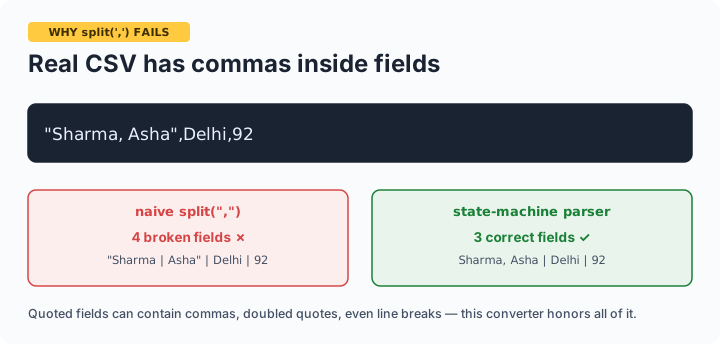
Why naive split(',') fails: real CSV allows commas inside quoted fields ("Sharma, Asha",Delhi is two fields, not three) and even line breaks inside quotes. This converter uses a proper state-machine parser, so exports from Excel and Sheets convert correctly.
Exporting CSV correctly first
From Excel: File → Save As → CSV UTF-8 (the plain "CSV" option mangles Hindi and special characters). From Google Sheets: File → Download → CSV. Paste the result here. Type coercion turns 92 into a JSON number and true into a boolean — turn it off if you have ID columns with leading zeros (007) or phone numbers that must stay strings. This tool is the reverse of our JSON to CSV converter; together they round-trip cleanly.
Frequently asked questions
Why do commas inside my data break other converters?
Because they split on every comma. Real CSV wraps such fields in quotes — "Sharma, Asha" is one field — and doubles internal quotes. This tool implements the actual CSV rules (RFC 4180 style), so Excel and Sheets exports parse correctly, including line breaks inside quoted fields.
How are numbers and booleans handled?
With type conversion on, values that look like numbers become JSON numbers and true/false become booleans. Turn it off when that's wrong — pin codes with leading zeros, phone numbers, and long IDs should stay strings, and the checkbox preserves them exactly as typed.
What if my rows have different numbers of fields?
Missing trailing fields become empty strings under their headers; extra fields beyond the header count are dropped. If your output looks shifted, the usual culprit is an unquoted comma in the source data.
Is my data uploaded?
No — parsing happens in your browser. Spreadsheet exports often contain customer or business data; it never leaves your device.