Image Metadata Viewer & Remover
See exactly what your photo reveals — camera, timestamps, GPS location — then download a clean copy with every trace removed. Lossless: the image pixels are untouched. Your photo never leaves your device.
Metadata found in
⚠ Location data found. This photo contains GPS coordinates: . Anyone with the file can see where it was taken.
| Field | Value |
|---|
✓ No metadata found. contains no EXIF, GPS, or text metadata. It's already clean.
What's hiding in your photos? A typical phone photo contains the exact date and time it was taken, your phone model, camera settings, editing software — and GPS coordinates accurate to a few meters. Photos shared as files, email attachments, or website uploads keep all of it.
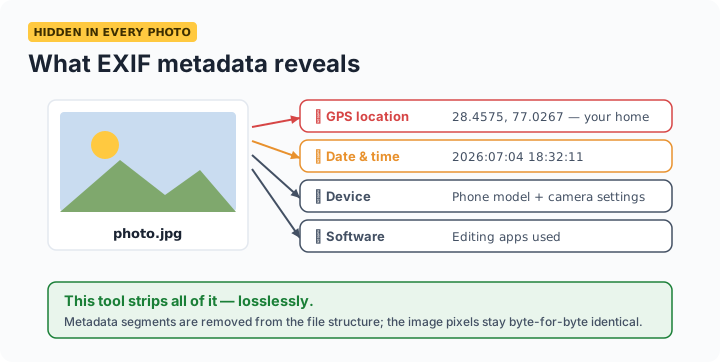
How to view and remove photo metadata
Select a photo above. The viewer instantly lists everything embedded in the file — if GPS coordinates are present, you'll see a location warning. Click Download clean copy to save a version with all metadata stripped. The removal is lossless: this tool deletes the metadata segments from the file structure without re-encoding the image, so the pixels in the clean copy are byte-for-byte identical to the original. Most other removers re-compress your photo, quietly degrading it — this one doesn't.
What metadata does this tool detect and remove?
| Metadata type | What it reveals | Removed? |
|---|---|---|
| GPS location (EXIF GPS IFD) | Where the photo was taken, to within meters | Yes |
| Date & time (EXIF) | Exactly when the photo was taken | Yes |
| Camera make & model | Your phone or camera model | Yes |
| Camera settings | Aperture, ISO, focal length, lens | Yes |
| Software tags | Editing apps used (Photoshop, Lightroom, etc.) | Yes |
| XMP / IPTC data | Author, copyright, keywords, edit history | Yes |
| PNG text chunks | Software, comments, AI-generation prompts | Yes |
When should you remove photo metadata?
Before selling items online with photos taken at home (GPS reveals your address), before posting photos of children, when sharing photos as email attachments or WhatsApp documents (these keep full metadata, unlike normal in-app sharing), before uploading images to your own website or marketplace listings, and any time a photo will leave your control as an original file.
Frequently asked questions
What metadata is hidden in my photos?
Typically: exact date and time taken, camera or phone model, camera settings, editing software, and — most sensitively — GPS coordinates of where it was taken, often accurate to a few meters.
Does removing EXIF data reduce image quality?
Not here. The tool removes metadata segments without re-encoding, so the pixels are byte-for-byte identical. Many other tools re-compress during removal — this one doesn't.
Is it safe to use this tool with private photos?
Yes — photos are never uploaded. Everything happens in your browser's memory. You can disconnect from the internet after the page loads and it still works.
How do I remove the GPS location from a photo?
Select the photo — GPS coordinates appear in the report if present — then click Download clean copy. To prevent recording location in future, disable location access for your camera app.
Do WhatsApp, Instagram, and Facebook remove EXIF data?
They strip most of it from photos shown to other users — but they read it themselves first, and photos sent as documents/files keep everything, as do email attachments and website uploads. Cleaning before sharing is the only certainty.
Does this work with iPhone HEIC photos?
The tool processes JPEG and PNG. Set your iPhone camera to Most Compatible (Settings → Camera → Formats) to shoot JPEG, or convert HEIC to JPEG first, then clean it here.