Image Compressor
Compress any photo two ways: pick a quality level and see the size instantly, or enter a target size in KB — 20KB, 50KB, 100KB — and the tool finds the quality that fits. Perfect for government form uploads, all on your device.
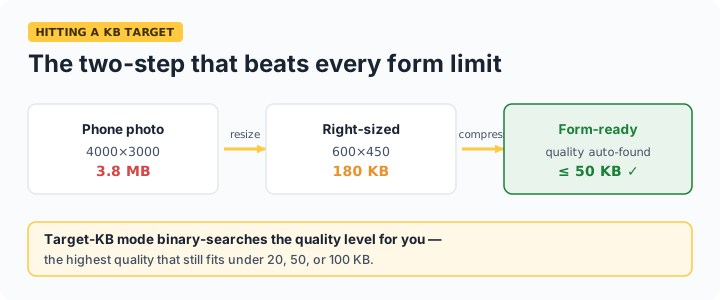
Target-size mode is the shortcut: forms for SSC, UPSC, passports, and bank KYC demand photos under exact limits like 20KB or 50KB. Enter the number, and the compressor binary-searches the quality setting until your image fits just under it — no trial and error.
Common upload limits in India
| Form / portal | Typical photo limit | Typical signature limit |
|---|---|---|
| SSC applications | 20–50 KB | 10–20 KB |
| UPSC | 20–300 KB | 20–300 KB |
| Passport Seva | Under 100 KB | — |
| Bank KYC / job portals | 50–200 KB | varies |
Always check the exact limit on your form — they change between recruitment cycles. If even minimum quality can't reach a very small target, the image has too many pixels for the byte budget: run it through our image resizer first (e.g. down to 400–600px wide), then compress. Photos never leave your device at any step.
Frequently asked questions
How do I compress an image to exactly 20KB or 50KB?
Enter the target in the KB field (or tap a preset chip) and click Compress. The tool tries multiple quality levels automatically, converging on the highest quality that stays under your limit — no manual trial and error. If it can't reach the target, resize the image smaller first, then compress.
Does compressing reduce image quality?
JPEG and WebP compression are lossy, so yes — but at 70–85% quality the difference is invisible for photos at normal viewing sizes. Heavy compression (below ~40%) shows visible artifacts. The preview lets you judge before downloading.
Why does my PNG get so much smaller as JPEG?
PNG is lossless and stores photos inefficiently; JPEG is designed for photographs and typically comes out 5–10× smaller. The trade-offs: JPEG has no transparency (this tool fills it white) and slight quality loss. For graphics with sharp edges and few colors, PNG can actually be smaller.
Is my photo uploaded to a server?
No — compression happens entirely in your browser using the canvas API. Passport photos and KYC documents are sensitive; here they go from your device's storage to browser memory and back to your downloads, nothing else.