JWT Decoder
Paste a JWT and see its decoded header and payload instantly, with exp, iat, and nbf timestamps converted to human dates and a clear expired/valid indicator. Decoding happens locally — the token never leaves your browser.
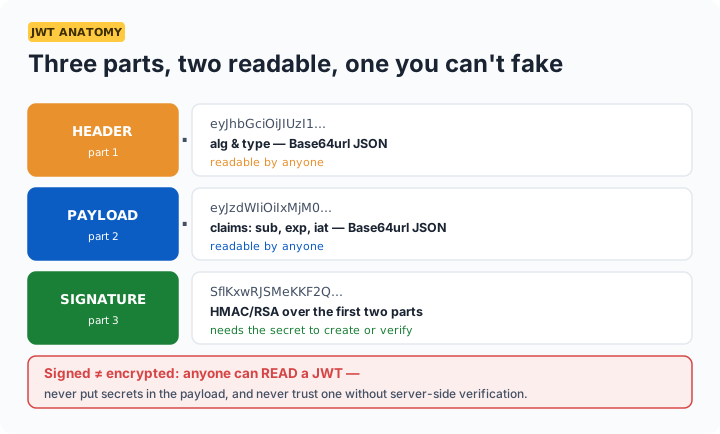
Important distinction: this tool decodes — it does not verify. A JWT's header and payload are just Base64url-encoded JSON anyone can read; the signature proves authenticity but requires the secret/public key to check. Never treat a decoded payload as trusted without server-side verification.
Reading the standard claims
| Claim | Meaning |
|---|---|
sub | Subject — usually the user ID the token represents |
iss / aud | Who issued it / who it's intended for |
exp / iat / nbf | Expiry, issued-at, not-before — Unix timestamps (this tool converts them) |
alg (header) | Signing algorithm — HS256 (shared secret) and RS256 (public/private key) are the common ones; alg: none in the wild is a red flag |
Debugging tip: the most common JWT bug is clock-related — an exp that looks fine but is in seconds vs milliseconds confusion upstream, or server clock skew making fresh tokens appear expired. The converted dates above make both obvious at a glance.
Frequently asked questions
Is it safe to paste a real JWT into this tool?
The token is decoded entirely in your browser and never transmitted — safe in that sense. Still, treat live production tokens like passwords: a JWT often IS a valid session credential, so prefer expired tokens or ones from test environments when debugging in shared settings.
Why can I read the payload without the secret key?
Because JWTs are signed, not encrypted — the header and payload are just Base64url-encoded JSON, readable by anyone. The secret protects integrity (proving nothing was altered), not confidentiality. Never put sensitive data in a JWT payload.
Does this tool verify the signature?
No — verification requires the signing secret (HS256) or public key (RS256), and doing it client-side would mean pasting secrets into a browser, which you should never do. This tool decodes and inspects; verification belongs on your server with a proper JWT library.
My token looks valid but the server rejects it — why?
Usual suspects in order: expired (check the exp status above), clock skew between servers, wrong audience/issuer claims for that endpoint, or the token was signed with a different key than the server verifies with. The decoded claims make the first three checkable in seconds.